
Japanese Version is here.
To receive P&L data in KM Calendar or the Auto P&L Report, you need to keep one of the following running at all times on the MetaTrader 4/5 chart from which you want to send data:
- Indicator: EAHelperLite (Free)
- Indicator: EAHelper (Paid)
- Expert Advisor (EA): KingCrimson (Paid)
Previous day’s P&L data is provisionally sent to the storage server shortly after midnight (server time) + a random few minutes. Please make sure MetaTrader is running around that time (midnight server time).
EAHelperLite – Installation & Setup
| MetaTrader 4 | MetaTrader 5 | |
|---|---|---|
| ① Download | https://x.gd/eM1vG | https://x.gd/XLxC0 |
| ② Open the Data Folder | 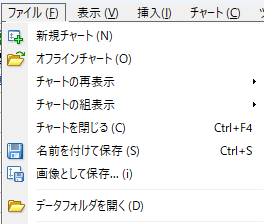 | 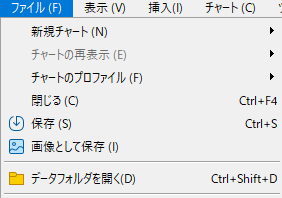 |
| ③ Place the downloaded file in MQL*\Indicators | MQL4 → Indicators EAHelperLite_****.ex4 | MQL5 → Indicators EAHelperLite_****.ex5 |
| ④ Restart MetaTrader | Restart MetaTrader 4 | Restart MetaTrader 5 |
| ⑤ Attach to Chart & Run | In the Navigator panel, find Indicators → EAHelperLite_**** and drag & drop it onto a chart.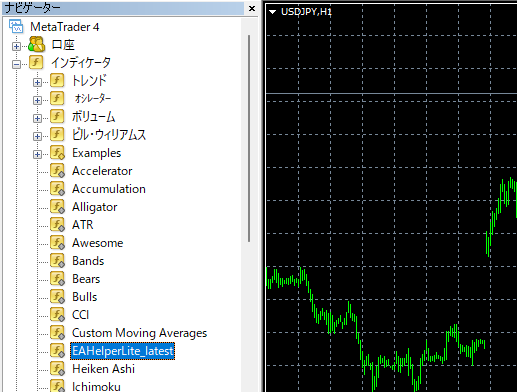 | In the Navigator panel, find Indicators → EAHelperLite_**** and drag & drop it onto a chart.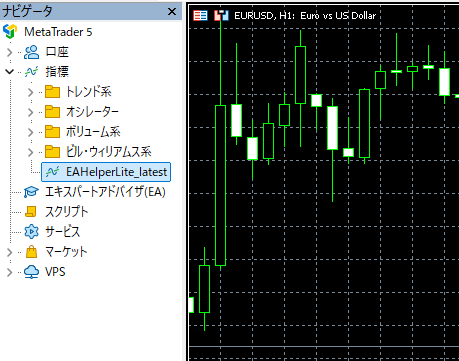 |
| ⑥ Configure Parameters | (See the parameter description below) | (See the parameter description below) |
Disclaimer
・This indicator is provided for trading support purposes only and does not constitute a recommendation for any specific investment decision. All trading/investment decisions made using this indicator are entirely at the user's own risk.
・The author makes no guarantees regarding the accuracy, usefulness, or operational stability of this indicator.
・The author assumes no liability for any damages arising from the use of this indicator (including losses, data loss, hardware failure, or financial damage).
・The content of this indicator and this page may be changed or removed without notice.

Prohibited Actions
・Unauthorized reproduction, redistribution, resale, or modification of this indicator is prohibited.
・If you wish to redistribute it, please obtain the author's permission first.

Privacy Policy
・See here
Parameter Description
| floating loss | Display Settings | ||
| currency | Currency unit | Sets the currency unit display: JPY (Yen) / USD (Dollar) / USC (Cent Dollar) |
| include swap | Include swap | Whether to include swap in P&L calculation |
| include commition | Include commission | Whether to include commission in P&L calculation |
| output csv | CSV output to Files folder | Whether to output P&L data CSV to MQL4\Files or MQL5\Files |
| profits report | P&L Data Transmission | ||
| enable sending | Send | Whether to send P&L data for external tools. If enabled, data is sent at the server-time date rollover (midnight). |
| identifier name | Identifier name | A string used to identify this EAHelperLite instance in external tools |
| reading password | Read password | Password used by external tools to receive P&L data |
For EAHelperLite, EAHelper, and KingCrimson — while parameter names may differ slightly — please configure the above three items to receive data in external tools.
EAHelper – Paid Version
In addition to the KM Calendar data transmission feature, EAHelper is an all-in-one EA support indicator packed with convenient features for EA trading.
- EAHelper for MT4 — Available at GogoJungle
- EAHelper for MT5 — Available at GogoJungle